Lenses
The Best Anamorphic Lenses for iPhone Photography and Video in 2026
The iPhone has come a long way as a filmmaking tool. Modern models shoot stunning 4K video, handle low light remarkably well, and fit comfortably in your poc...
The iPhone has come a long way as a filmmaking tool. Modern models shoot stunning 4K video, handle low light remarkably well, and fit comfortably in your pocket. But if you want to push your iPhone footage into genuinely cinematic territory — the kind of wide, immersive look you see in Hollywood productions — there's one accessory that makes all the difference: an anamorphic lens.
In this guide, we'll cover the best anamorphic lenses for iPhone available right now, explain how they work, and help you figure out which one is the right fit for your shooting style and budget.
What Is an Anamorphic Lens and Why Use One on an iPhone?
An anamorphic lens contains additional optical elements that horizontally compress, or "squeeze," the image as it's captured. When that image is de-squeezed in playback or post-processing, the result is an ultra-wide aspect ratio that's far broader than what a standard lens can produce.
This is the same optical technology used in professional cinema production. Films like Alien, Inception, and countless other Hollywood titles were shot with anamorphic lenses, and the look they produce is immediately recognizable — wide, expansive frames, oval-shaped bokeh, and those distinctive horizontal lens flares that catch the light in a way no standard lens can replicate.
When you attach an anamorphic lens to your iPhone, you're bringing that same cinematic quality to a device that already fits in your pocket. The result is footage that looks far more intentional and polished than anything the native camera app can produce on its own — without spending hours in post-production trying to fake the effect.
The 5 Best Anamorphic Lenses for iPhone
1. Moment T-Series 1.55x Anamorphic Lens — Best Overall
Pros: Ultra-wide 2.76:1 cinematic output · Sharp image quality with minimal distortion · Aerospace-grade metal build · Beautiful anamorphic flares and bokeh · Fast T-Series mounting system Cons: Works best with the Moment app · Requires a compatible case or mount
The Moment T-Series 1.55x is the standout choice for iPhone anamorphic photography, and it's not particularly close. The 1.55x squeeze factor produces a dramatic 2.76:1 aspect ratio — the classic Cinemascope look — giving your footage an unmistakably cinematic quality straight out of the camera.
Image quality is excellent across the board. Sharpness is impressive, bokeh is smooth and pleasing, and there's no frustrating vignetting or color fringing to deal with in post. The horizontal lens flares that appear when shooting into light sources add a genuine Hollywood touch that's difficult to replicate any other way.
The build quality matches the optical performance. The lens is machined from aerospace-grade metal, making it one of the more durable iPhone accessories you can buy — a real advantage for photographers who shoot outdoors in variable conditions. Mounting is quick and secure via Moment's T-Series twist-lock system, which works with both official Moment cases and universal mounting adapters.
The one caveat worth noting: to get the best results, you'll want to shoot using the Moment app rather than the default iPhone Camera app, as it handles anamorphic de-squeezing natively.
2. Moment T-Series 1.33x Anamorphic Lens — Best Value
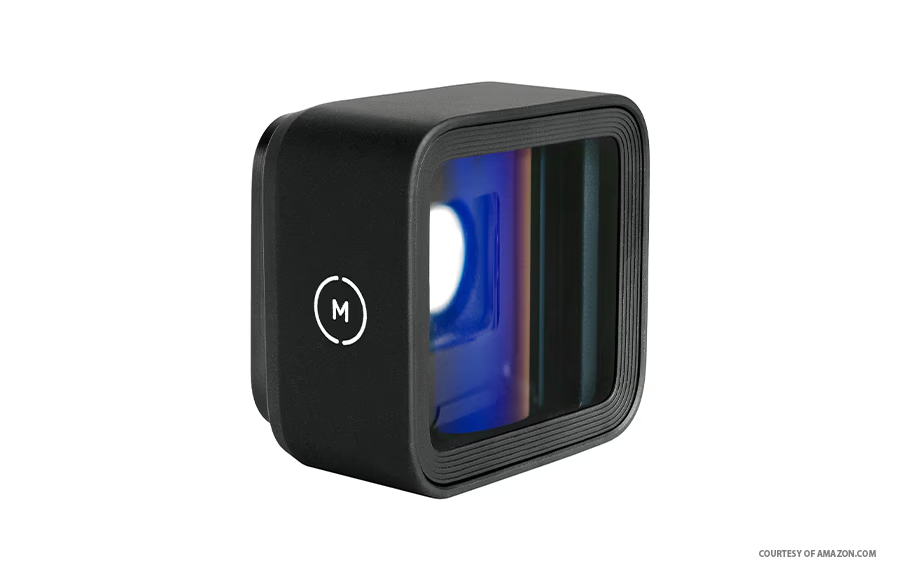
Pros: Excellent value · Classic 2.40:1 aspect ratio · Stylish blue lens flare · Durable metal construction · Includes accessories and two-year warranty Cons: Less dramatic than the 1.55x squeeze
If the 1.55x feels like more lens than you need, the Moment T-Series 1.33x offers a slightly more restrained cinematic look at a friendlier price point — and it's still an outstanding performer.
The 1.33x squeeze produces a 2.40:1 (21:9) aspect ratio for video and 1.78:1 (16:9) for stills. That's the same widescreen ratio used across much of modern cinema and streaming content, making it a natural fit for YouTube, short films, and social media content that needs to stand out. The look is a little less dramatic than 2.76:1, but it's also more versatile and easier to work with across different editing platforms.
One of this lens's most distinctive characteristics is its blue lens flare, which gives footage a cool, slightly vintage quality reminiscent of '60s and '70s filmmaking. It's a subtle but effective touch that adds character without overwhelming the image.
Every purchase includes a lens cap, hex tool, and microfiber carrying bag, along with a two-year manufacturer's warranty. It's also compatible with Android devices via the T-Series interface, making it a flexible option if you shoot across multiple platforms.
3. ShiftCam LensUltra 1.55x Anamorphic Lens — Best for Cinematic Quality
Pros: Ultra-wide 2.76:1 video aspect ratio · Exceptional sharpness and color accuracy · Fluorite glass elements reduce color fringing · Stunning film-style flares and bokeh · Ideal for serious video creators Cons: Higher price point · May be overkill for casual shooters
For photographers and filmmakers who refuse to compromise on optical quality, the ShiftCam LensUltra 1.55x is in a class of its own. This lens is built around premium fluorite glass elements — a material more commonly found in high-end cinema lenses — which dramatically reduces chromatic aberration and color fringing while boosting overall color accuracy and contrast.
The results speak for themselves. Footage captured with this lens has a richness and depth that's genuinely difficult to achieve with smartphone glass alone. Colors pop with natural vibrancy, bokeh is smooth and organic, and the anamorphic lens flares are beautifully rendered — the kind of effect that used to require a full cinema rig to achieve.
At 1.55x, the squeeze factor delivers a 2.76:1 aspect ratio for video and 2.35:1 for stills, both of which are standard cinematic formats. If you're producing short films, music videos, or any content where visual quality is a priority, this lens is worth the premium.
4. Beastgrip Pro Series 1.33x Anamorphic Lens MK2 — Most Flexible
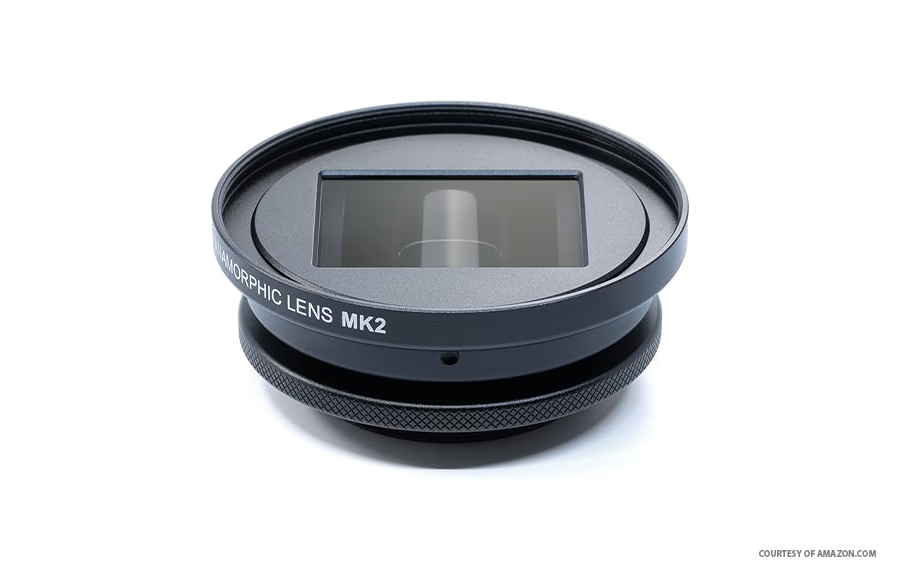
Pros: Pro-grade build quality · Sharp optics with minimal distortion · Compatible with filters and flare add-ons · Highly customizable · Works with iPhone and Android rigs Cons: Requires additional Beastgrip accessories to mount · Higher total cost when rig is included
The Beastgrip Pro Series 1.33x MK2 is the choice for mobile filmmakers who want to build out a proper production rig around their iPhone. This isn't just a lens you clip on and forget — it's a modular component designed to integrate with a broader system of professional accessories.
The optical performance is excellent. Professional-grade cylindrical glass elements and a high-end anti-reflective coating deliver sharp, clean images with minimal distortion, and the lens handles a wide range of lighting conditions with confidence. Where this lens really distinguishes itself, though, is in its flexibility. It accepts a variety of filters and lens flare add-ons, allowing you to dial in a specific look for each project rather than being locked into a single aesthetic.
The trade-off is that you can't simply attach this lens directly to your iPhone. You'll need to invest in a compatible Beastgrip rig or cage, which adds to the overall cost. For serious mobile filmmakers who are already building out a rig setup, this is a natural fit. For casual shooters, the added complexity may not be worth it.
5. Freewell Pro Filmmaker Cine Pro Kit with 1.33x Anamorphic Lens — Best Complete Kit
Pros: All-in-one filmmaking kit · Includes lens, ND filter, grip, and case · Excellent value compared to buying components separately · Available for multiple iPhone models Cons: High upfront price · Less modular than building your own kit
If you're new to mobile filmmaking and want to get everything you need in a single purchase, the Freewell Pro Filmmaker Cine Pro Kit is a compelling option. Rather than sourcing a lens, a mount, a grip, and filters separately, this kit bundles everything together in a package designed to work seamlessly out of the box.
The kit includes a 1.33x neutral flare anamorphic lens, a variable ND filter, a multifunction grip with Bluetooth remote, and a protective smartphone case — all matched to your specific iPhone model. The anamorphic lens itself delivers a wide aspect ratio, pleasing bokeh, and rich flares comparable to the Moment T-Series 1.33x, and it plays well with popular third-party camera and editing apps.
The variable ND filter is a particularly useful inclusion. Controlling exposure in bright conditions is one of the trickier aspects of mobile filmmaking, and having a quality ND filter in the kit removes that headache immediately. For beginners and aspiring filmmakers who want a significant, immediate upgrade to their iPhone's capabilities, this kit delivers excellent value.
How to Choose the Right Anamorphic Lens for Your iPhone
Squeeze Factor: 1.33x vs. 1.55x
This is the most fundamental choice you'll make. A 1.33x lens produces a 2.40:1 aspect ratio — the standard widescreen format used across most modern cinema and streaming content. It's versatile, easy to work with in editing, and well-suited to YouTube and social media. A 1.55x lens goes wider still, producing a 2.76:1 Cinemascope-style ratio that's more dramatic and visually striking. If you're making short films or music videos where the cinematic look is the whole point, 1.55x is worth the extra challenge.
Build Quality and Optics
The quality of the glass elements directly affects sharpness, color accuracy, and how well the lens performs in low light. Premium lenses use multi-coated glass or fluorite elements to reduce chromatic aberration and flaring. Metal bodies are more durable than plastic and better suited to regular outdoor use.
Mounting and Compatibility
Check that any lens you're considering is compatible with your specific iPhone model before purchasing. Some lenses require proprietary mounts or cases, while others work with universal clip-on or thread-based systems. If you plan to build out a rig over time, choosing a lens that integrates with a broader accessory ecosystem — like the Moment T-Series or Beastgrip system — gives you more room to grow.
Camera App Support
The default iPhone Camera app doesn't support anamorphic de-squeezing. You'll need a third-party app — such as the Moment app, Filmic Pro, or Mavis — to preview and record with the correct aspect ratio. Most quality anamorphic lenses have recommended app pairings, so check the manufacturer's guidance before you start shooting.
Practical Tips for Shooting with an Anamorphic Lens on iPhone
- Always shoot in the app's anamorphic or de-squeeze mode so you can preview the final framing in real time rather than guessing how the squeezed image will look after editing.
- Keep your horizon level. The wide aspect ratio of anamorphic footage makes a crooked horizon far more noticeable than it would be in standard video.
- Use light sources creatively. Anamorphic flares are one of the most distinctive features of this format — don't hide from them. Position lights, windows, or the sun at the edge of the frame to capture those beautiful horizontal streaks.
- Shoot in LOG or a flat color profile if your app supports it. This gives you far more flexibility in color grading and helps the footage hold up better in post-production.
- Stabilize your shots. The wide field of view amplifies camera shake. Use a gimbal, a grip, or at minimum brace your elbows against your body for handheld shots.
- Clean your lens before every shoot. Fingerprints and smudges affect anamorphic lenses more visibly than standard lenses, particularly when shooting toward light sources.
Conclusion
An anamorphic lens is one of the most impactful upgrades you can make to your iPhone filmmaking setup. The difference in look and feel between standard iPhone footage and properly shot anamorphic footage is striking — wider, more immersive, and immediately more cinematic.
For most users, the Moment T-Series lineup offers the best combination of optical quality, build durability, and ease of use. The 1.55x is the top pick for maximum cinematic impact, while the 1.33x is a more versatile everyday option. If optical quality is your absolute priority, the ShiftCam LensUltra 1.55x is worth the premium. For those who want to build a full mobile production rig, the Beastgrip Pro Series MK2 offers the most flexibility. And if you're just getting started and want everything in one box, the Freewell Cine Pro Kit is an excellent all-in-one solution.
Whatever you choose, take the time to learn your lens, experiment with light, and explore what the anamorphic format can do — the results might surprise you.
Frequently Asked Questions
Do I need a special app to use an anamorphic lens on my iPhone? Yes. The native iPhone Camera app doesn't support anamorphic de-squeezing, so you'll need a third-party app to preview and record with the correct aspect ratio. Popular options include the Moment app, Filmic Pro, and Mavis. Most of these apps have a dedicated anamorphic or de-squeeze mode that you simply toggle on before shooting.
What's the difference between a 1.33x and a 1.55x anamorphic lens? The number refers to the squeeze factor — how much the lens compresses the image horizontally. A 1.33x lens produces a 2.40:1 aspect ratio, which is the standard widescreen format used in most modern films and streaming content. A 1.55x lens goes wider, producing a 2.76:1 Cinemascope-style ratio that's more dramatic and visually striking. Neither is objectively better; the right choice depends on the look you're going for and how you plan to use the footage.
Can I use an anamorphic lens for iPhone photography as well as video? Yes, anamorphic lenses work for both stills and video. For photos, the wide aspect ratio produces panoramic-style images with beautiful bokeh and distinctive flares. That said, anamorphic lenses are most commonly used for video, where the cinematic wide-format look has the greatest impact.
Are anamorphic lenses compatible with all iPhone models? Compatibility varies by lens and manufacturer. Most brands offer versions designed for specific iPhone models or generations, and some require proprietary cases or mounts. Always check the manufacturer's compatibility list before purchasing to make sure the lens will work with your specific device.
Is an anamorphic lens worth it for casual iPhone users? It depends on what you're trying to achieve. If you regularly shoot video and want a more cinematic look without investing in a dedicated camera, an anamorphic lens is a genuinely worthwhile upgrade. For casual snapshots or social media photos, the standard iPhone camera is more than sufficient. The sweet spot is for anyone who's serious about mobile filmmaking or content creation and wants their footage to stand out from the crowd.